PrintPilot: Overview (Dashboard)
The Overview page is the primary dashboard of PrintPilot. It provides a real-time snapshot of your email processing activity, current configuration, and licensing health.
Interface Overview
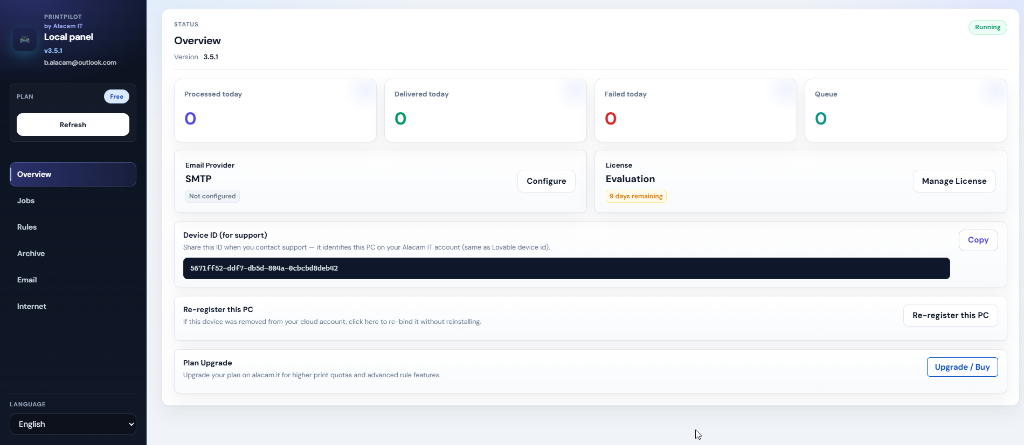
Dashboard Components Explained
Below is a detailed breakdown of each section available on the Overview screen:
Status & Version
Located at the top left. Indicates whether the PrintPilot service is currently Running or Stopped, along with your installed software version.
Daily Statistics
Processed today: captured jobs. Delivered: sent emails. Failed: failed to send. Queue: waiting.
Email Provider
Displays your currently configured outgoing email server. If no provider is configured, it will prompt you to set one up.
License Status
Shows your current active plan and remaining quota. Use the Manage License button to manage your subscription.
Device ID (for support)
A unique identifier string for this specific PC. Share this ID when contacting Alacam IT support so they can locate your device quickly.
Re-register this PC
If your device was unlinked or removed from your cloud account, click this button to re-bind it securely without needing to reinstall the PrintPilot software.